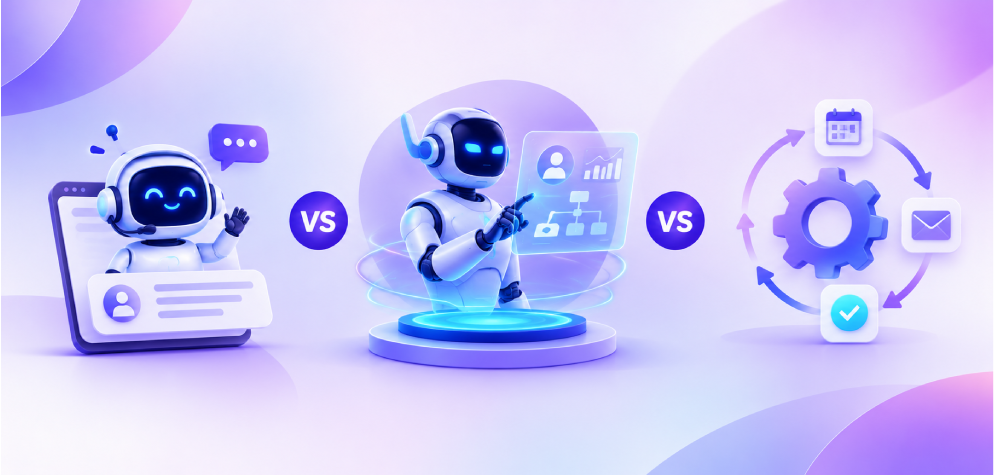
All three promise to save time, but they work in very different ways. Learn what each one does, where each one falls short, and how to pick the right one for your business, with simple examples, an interactive decision helper and a quick quiz at the end.
Automation
Follows the rules you set.
“If this happens, do that.”Chatbot
Talks with people.
“How can I help you today?”AI Agent
Works toward a goal.
“I'll plan it, do it, and report back.”What you'll learn in this guide
15 short lessons. Click any lesson to jump straight to it. Your progress is ticked off as you read.
- 01Why these three get confused
- 02What is automation?
- 03What is a chatbot?
- 04What is an AI agent?
- 05How we got here: a short timeline
- 06Side-by-side comparison table
- 07One request, three approaches
- 08Capability scorecard
- 09Use cases by industry
- 10Which one do you need?
- 11Effort, timeline and the hybrid stack
- 12Myths vs facts
- 13Quick quiz: test yourself
- 14Get expert help
- 15Frequently asked questions
Why everyone mixes up these three
Walk into any business meeting about AI today and you'll hear the words automation, chatbot and AI agent used as if they mean the same thing. Vendors often market a simple workflow as an "agent", and a scripted FAQ bot as "AI". No wonder buyers are confused.
The truth is simple: automation executes steps, chatbots hold conversations, and AI agents pursue goals. Each one solves a different problem, costs a different amount to build, and fails in different ways.
Picking the wrong one is expensive. Use an agent where a simple workflow would do and you pay for complexity you don't need. Use a basic bot where real judgment is required and your customers feel it immediately. This guide gives you a clear mental model so you can choose with confidence.
A simple way to remember it
A train on tracks
Fast, reliable and tireless, but it can only go where the tracks are laid. If something blocks the line, it stops.
A front-desk receptionist
Friendly and always available. Answers questions and points you in the right direction, but usually can't do the work for you.
A project manager
Give it a goal and it works out the steps, uses the tools it has, handles surprises and tells you when it's done.
What is automation?
Automation is software that carries out a fixed sequence of steps whenever a trigger happens. It does exactly what it is told, the same way every time, without thinking or deciding anything new.
Example: a new lead fills in your website form
Every lead goes through the same path in seconds. But if someone writes “call me after Diwali” in the message box, the workflow can't understand it. It just follows the rules.
Where it shines
- High-volume, repetitive tasks
- Structured data (forms, CSVs, orders)
- Predictable, auditable results
- Cheapest and fastest to set up
Where it struggles
- Messy or unstructured input (emails, chat)
- Exceptions the rules didn't plan for
- Anything that needs judgment
- Breaks when a connected app changes
What is a chatbot?
A chatbot is software that talks with people through text or voice. It understands a question, finds the best answer and replies, usually inside a website widget, WhatsApp or a support app.
Rule-based chatbot
Uses buttons, keywords and decision trees. Great for simple menus, but it gets stuck the moment someone types something unexpected.
“Please choose option 1, 2 or 3.”AI chatbot (LLM-powered)
Uses a large language model to understand natural language and answer from your knowledge base. Handles typos, follow-ups and different ways of asking.
“Sure, here's how our return policy works…”The key limit: a chatbot is brilliant at telling you things, but most chatbots can't do things across your systems. It can explain your refund policy. It usually can't check the order, approve the refund and update your CRM. That is where AI agents come in.
What is an AI agent?
An AI agent is software that is given a goal, not a script. It uses an AI model to reason about what to do, takes actions with real tools (your CRM, inbox, database, calendar), checks the results and keeps going until the job is done, or asks a human when it is unsure.
1. Perceive
Reads the incoming request and gathers context: who the customer is, their order history and any earlier messages.
Tip: click a step on the loop to explore it.
The four building blocks of every agent
Brain (LLM)
A large language model that understands the goal, reasons step by step and decides what to do next.
Tools
APIs and integrations it can use: search the database, send an email, create a ticket, book a meeting.
Memory
Short-term context for the current task plus long-term knowledge about customers, policies and past cases.
Guardrails
Rules, permissions and human approval points that keep the agent safe, on-brand and within budget.
From scripts to agents: a short timeline
Each generation didn't replace the last one. It added a new layer on top. That is why all three still exist side by side today.
Scripts, macros and scheduled jobs
Spreadsheet macros, batch files and cron jobs automate single, repetitive tasks. Powerful, but only developers can build them.
AutomationWorkflow tools and RPA
No-code platforms like Zapier connect apps with “if this, then that” rules, and RPA bots copy human clicks on screens. Automation reaches business teams.
AutomationThe first wave of chatbots
Messenger and website bots appear everywhere. Most rely on buttons and keywords, so conversations quickly hit dead ends.
ChatbotsLLM chatbots go mainstream
Large language models make it possible to understand almost any question in plain language. Chatbots finally feel natural.
ChatbotsThe age of agentic AI
Models learn to use tools, plan multi-step work and collaborate with other agents. Software moves from answering questions to completing whole tasks.
AI AgentsAI agents vs chatbots vs automation: side by side
Spotlight one column to study it on its own, or hover any row to compare all three.
| Feature | Automation | Chatbot | AI Agent |
|---|---|---|---|
| Core job | Executes fixed steps | Answers and converses | Achieves a goal end to end |
| How it decides | Pre-written rules | Rules or an AI model | AI reasoning + rules |
| Handles messy input | Low | Medium | High |
| Takes actions in your apps | Yes, predefined only | Rarely | Yes, chooses which tools to use |
| Multi-step tasks | Yes, if every step is mapped | No | Yes, plans the steps itself |
| Memory & context | None | Within a conversation | Across tasks and sessions |
| Adapts to exceptions | Low | Medium | High |
| Predictability | High | Medium | Medium |
| Setup complexity | Low | Medium | High |
| Best for | Data syncs, alerts, reports | FAQs, support, lead capture | Support resolution, ops, research |
← Swipe to see all columns →
One customer request, three very different results
The best way to understand the difference is to watch each one handle the same real-world problem.
“Hi, my order #4521 arrived with a cracked screen. I'd like a refund, or a replacement if it can arrive before Friday.”
- Email arrives and the subject contains “refund”.
- Rule creates a support ticket tagged Refund.
- Auto-reply sends: “We received your request, we'll respond in 48 hours.”
- Ticket waits in the queue for a human agent.
- Chatbot understands the message and apologises.
- Explains the damaged-item policy clearly and politely.
- Shares a link to the returns form and asks for a photo.
- Priya still has to fill in the form; a human approves it.
- Looks up order #4521 and confirms the item and address.
- Checks stock and courier times: a replacement can arrive Thursday.
- Policy allows free replacement, so it creates the order and return label.
- Replies to Priya with tracking, updates the CRM and flags the courier for review.
Lesson: automation moves the request, a chatbot explains the answer, and an agent actually resolves the problem.
How they score on what really matters
Illustrative ratings out of 10, based on typical business deployments. Higher is better for every row.
Autonomy
Works without step-by-step instructions
Reasoning
Makes sensible decisions in new situations
Understands language
Handles emails, chats and voice in plain words
Takes real actions
Updates systems, sends, books and processes
Predictability
Gives the same output for the same input
Speed to launch
How quickly a first version can go live
Low running cost
Cost per task once it is live
What each one looks like in your industry
Hover over a card (or tap it on mobile) to flip it and see automation, chatbot and agent examples side by side.
eCommerce & Retail
Orders, stock, support and product catalogs.
Flip to see examples ↻eCommerce & Retail
- AutomationSync stock levels between supplier and store every hour.
- ChatbotAnswer sizing, shipping and return questions 24/7.
- AI AgentImport supplier products, write descriptions and handle refunds end to end.
Healthcare
Appointments, patient questions and follow-ups.
Flip to see examples ↻Healthcare
- AutomationSend appointment reminders by SMS the day before.
- ChatbotAnswer questions about clinic timings, services and insurance.
- AI AgentA voice receptionist that books, reschedules and updates the clinic calendar.
Tours & Travels
Bookings, itineraries and traveller support.
Flip to see examples ↻Tours & Travels
- AutomationEmail tickets and vouchers as soon as payment clears.
- ChatbotHelp travellers compare packages and answer visa basics.
- AI AgentRebook a missed tour, adjust the itinerary and notify the guide.
Insurance & Financial
Claims, onboarding, KYC and customer service.
Flip to see examples ↻Insurance & Financial
- AutomationRoute new claims to the right team based on type and value.
- ChatbotExplain policy coverage and claim status in plain language.
- AI AgentReview claim documents, flag missing items and prepare a decision for approval.
Education
Admissions, students, teachers and courses.
Flip to see examples ↻Education
- AutomationSend fee reminders and attendance reports automatically.
- ChatbotAnswer admission, course and timetable questions instantly.
- AI AgentA tutor that builds a study plan, checks work and adapts to each student.
Which one does your business need?
Think of one task you want to improve, then answer four quick questions about it.
1Is the task repetitive, with the same steps and structured data every time?
2Do customers or staff need to ask questions in their own words?
3Does the task require doing things in other systems (CRM, orders, calendar)?
4Does it involve exceptions or judgment calls that rules can't cover?
Effort, timeline and how they work together
Typical ranges for a first production version. Your project may be faster or slower depending on integrations, data quality and scope.
- Map the steps and connect the apps
- Test edge cases and error alerts
- Low ongoing maintenance
- Prepare your knowledge base and FAQs
- Design tone, handover and fallbacks
- Review conversations and improve answers
- Define goals, tools and permissions
- Build guardrails and human approval steps
- Evaluate, monitor and tune over time
The smartest setup is usually a mix
You rarely have to pick just one. In most of the systems we build, the three work as layers of the same solution:
- Chatbot is the front door that talks to customers.
- AI agent is the brain that decides what needs to happen.
- Automation is the reliable backbone that executes the fixed steps.
Start with the simplest layer that solves today's problem, then add intelligence where it pays off.
Common myths, busted
Click each myth to reveal the truth. 0 of 6 revealed.
Quick quiz: can you tell them apart?
Five questions, about one minute. Pick the best answer for each.
Not sure which one fits your business?
Tell us about one process that slows your team down. In a free 30-minute consultation we'll tell you whether it needs automation, a chatbot, an AI agent or a mix, and what it would take to build.
- Voice AI agents
- LLM development
- Workflow automation
- AI chatbots
Frequently asked questions
Quick answers to the questions business owners ask us most about AI agents, chatbots and automation.
No questions match your search.
Automation follows fixed rules to complete repetitive steps. A chatbot holds conversations and answers questions. An AI agent is given a goal, reasons about how to reach it, and takes actions across your tools until the job is done.
In everyday use, ChatGPT works as an AI chatbot or assistant: you ask, it answers. When an AI assistant is connected to tools and allowed to plan and carry out multi-step tasks on its own, such as browsing, filling forms or updating systems, it starts behaving like an AI agent.
Yes. If your chatbot already runs on a large language model, you can give it access to tools (like your order system or calendar), add memory and define guardrails. That turns it from something that only answers into something that can also act.
No. RPA (robotic process automation) mimics human clicks and keystrokes on a fixed path. It is a form of automation. An AI agent decides what to do next based on the situation, so it can handle exceptions that would make an RPA bot stop.
Automation is usually the cheapest and fastest, followed by chatbots. AI agents cost more because they need integrations, guardrails, testing and monitoring. They also deliver the most value when the task involves judgment and many steps.
They can be, when built properly. A well-designed agent only gets the permissions it needs, requires human approval for sensitive actions, logs every decision and follows your data-privacy rules. Safety comes from the design, not the AI model alone.
Not always. If your workflows are predictable, keep them. Add an AI agent when you hit tasks your workflows can't handle, such as reading free-text emails, making decisions or dealing with exceptions. Agents and workflow tools work well together.
A voice AI agent is an AI agent you talk to over the phone. It understands speech, answers naturally and takes actions during the call, like booking an appointment or updating a record. A virtual AI receptionist is a common example.
A focused first version typically takes around 6 to 12 weeks, depending on how many systems it connects to and how much testing is needed. Simple automations can go live in one to two weeks, and AI chatbots in about three to six.
Start with the task. If it is repetitive and rule-based, use automation. If people need answers in their own words, use a chatbot. If it needs decisions and actions across several systems, use an AI agent. Our decision helper above, or a free consultation, can help you choose.