
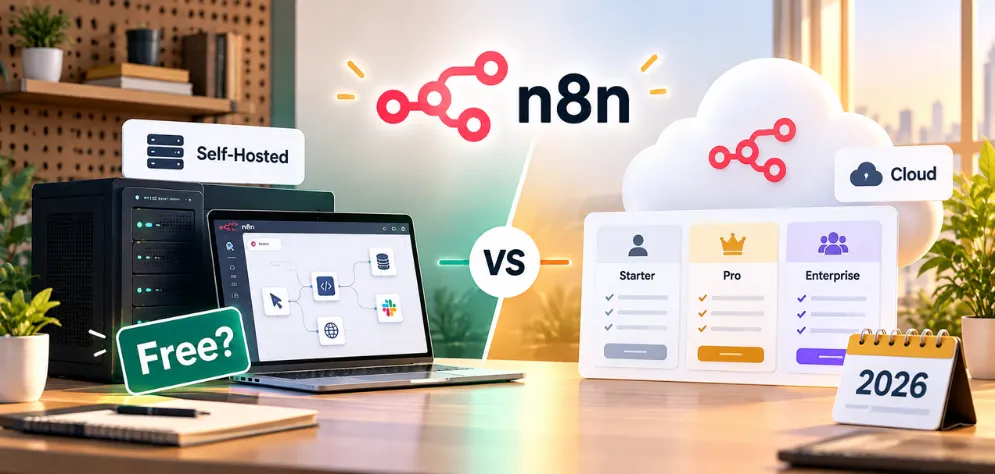
Short answer: Yes. The self-hosted n8n Community Edition is free to use for your own business. n8n Cloud is paid, starting at €20/month billed annually (€24 month-to-month) for 2,500 workflow executions.
Below we break down every plan, what "free" really costs when you self-host, the licence rules for commercial use, and a quick way to pick the right option.
n8n pricing in 30 seconds
There are three ways to run n8n. Only one of them is free, and "free" still has running costs. Here is which one fits you.
Community Edition (self-hosted)
You install n8n on your own server or VPS. The software is free for internal business, personal and non-commercial use. You only pay for hosting and the time to maintain it.
Best for: technical teams, agencies and anyone who wants full control of their data.
n8n Cloud (Starter & Pro)
n8n hosts, updates and backs everything up. Billed by workflow executions: 2,500/month on Starter and 10,000/month on Pro. Month-to-month costs €24 and €60.
Best for: businesses without a developer to manage servers.
Business & Enterprise
Business is self-hosted only, with 40,000 executions, SSO, Git version control and multiple environments. Enterprise is custom-priced and available on Cloud or self-hosted.
Best for: larger teams with governance, compliance or scaling needs.
What is n8n, and why can it be free?
n8n is a workflow automation platform. You connect apps, APIs, databases and AI models with visual nodes, and you can drop into JavaScript or Python whenever a no-code step isn't enough.
The company earns money from n8n Cloud hosting and from paid Business and Enterprise licences. That is why the core product can stay free for anyone willing to host it themselves.
"Fair-code", not open source
n8n's source code is public under its Sustainable Use License. You can use, modify and self-host it for free, but you can't sell n8n itself as a product or hosted service without a commercial agreement. Because of that limit, n8n doesn't describe itself as open source.
Every n8n plan in 2026, side by side
All plans include unlimited users, unlimited workflows and every integration. What changes is the number of executions, who hosts it and the team features.
Community
Self-hosted · your server
Free licence, you pay for hosting
- Custom nodes and bash scripts
- You handle updates, backups and security
- Community forum support
Starter
Hosted by n8n
- 5 concurrent executions
- AI Agent, MCP and AI nodes
- 1 shared project
- Forum support
Pro
Hosted by n8n
- 20–50 concurrent executions
- 3 shared projects, admin roles
- Workflow history and 7-day insights
- Global variables
Business
Self-hosted only
- SSO and LDAP
- Git version control, multiple environments
- Queue mode for scaling
- 6 shared projects, 30-day insights
Enterprise
Cloud or self-hosted
Contact n8n sales
- 200+ concurrent executions
- Log streaming, external secret stores
- 365-day insights, extended retention
- Dedicated support with SLA
ⓘPrices are from n8n.io/pricing (checked October 2026) and are in euros. US billing addresses are charged the same figures in dollars. n8n updates its plans often, so always confirm on the official page before you buy.
Self-hosted n8n vs n8n Cloud: what actually changes
The workflow editor is the same. The difference is who runs the server, who fixes it at 2 a.m., and where your data lives. Use the lens to see where each option wins.
The real cost of "free": what self-hosting n8n actually costs
The Community Edition licence costs nothing, but the server it runs on does. For a small business, the bill is usually a modest VPS plus a couple of hours a month of someone's time for updates, backups and fixing the odd broken workflow.
That time is the cost most people forget. If nobody on your team is comfortable with Docker, SSH and backups, Cloud Starter at €20/month is often cheaper overall.
High volume: lots of executions or heavy AI workflows may need a bigger server or extra worker machines.
Team features: SSO, Git version control and multiple environments need the paid Business licence, even when you self-host.
AI usage: calls to OpenAI, Anthropic or Google with your own API keys are billed by those providers, on top of hosting.
estimates, your numbers will vary
n8n cost calculator: Cloud vs self-hosted
Move the sliders to match your situation. The scale tips toward the option that costs you more each month.
Estimate only. Cloud prices from n8n.io/pricing (October 2026, EUR). Above 10,000 executions/month you need a larger Pro tier, Business (€667/mo, self-hosted) or Enterprise, so confirm the price with n8n. AI model costs (OpenAI, Anthropic, etc.) are extra in both cases.
What counts as an n8n execution?
One execution is one full run of a workflow, from trigger to last node. It doesn't matter how many steps it has or how much data it moves. Scroll to watch a run.
A webhook receives 25 new leads in one request…
A workflow that runs once a day uses 30–31 executions a month.
Frequent polling adds up fast. This alone nearly fills the Pro plan.
Each incoming event (form fill, order, call) is one execution.
Every message that triggers the workflow counts as one run.
Can you use free n8n for commercial work?
Mostly, yes. The Sustainable Use License allows internal business use and client work. It only restricts selling n8n itself, or a product whose value comes mainly from n8n. Hover or tap a card for an example.
Allowed with the free licence
Automating your own business
Internal workflows for your company.
Allowed↻ exampleSyncing your CRM to your database, sending invoices, routing support tickets or reporting, all for your own company.
Building workflows for clients
Consulting and implementation work.
Allowed↻ exampleAn agency builds and maintains n8n workflows for a client and charges for that service. Consulting and support around n8n are permitted.
n8n behind the scenes
Powering features in your own product.
Allowed↻ exampleYour users trigger automations you built, using your company's own credentials. They never see or open the n8n editor.
Needs a commercial licence
White-labelling n8n
Rebranding n8n as your own tool.
Needslicence↻ example
Putting your logo on n8n and selling it to customers as "YourBrand Automations".
Selling hosted n8n access
Charging people to use your n8n server.
Needslicence↻ example
Running an n8n instance and charging users a monthly fee to log in and build their own workflows on it.
Using customers' own logins
Connecting end users' accounts.
Needslicence↻ example
Your app asks each customer for their own HubSpot login and n8n uses it to pull their data. n8n's licence FAQ lists this as not allowed.
Whose credentials flow through n8n? Your company's: generally fine. Your customers' own: you need a commercial (Embed) agreement. Unsure about your case? n8n asks you to email license@n8n.io. This is a summary, not legal advice.
Self-hosted or Cloud? Answer 4 quick questions
No email, no sign-up. Pick the answer closest to your situation and we'll suggest where to start.
How to get started with n8n (both paths)
Cloud takes minutes. Self-hosting takes an afternoon, and a little care every month after that.
- 01
Start the free trial
Sign up on n8n.io. No credit card is needed. The trial gives you Pro-level features with limits of 1,000 executions and 5 concurrent runs.
- 02
Build and test your first workflows
Start from a template or from scratch. Note how often each workflow will run, because that decides your plan.
- 03
Pick a plan before the trial ends
Under 2,500 runs a month, choose Starter. Up to 10,000, choose Pro. Annual billing saves about 17%.
- 01
Get a VPS
A small Linux server (1–2 vCPU, 2–4 GB RAM) is enough for most small teams. Pick a region close to your users or your data rules.
- 02
Install Docker
Docker is the simplest way to install and update n8n, and it keeps it isolated from the rest of the server.
- 03
Run n8n (quick test)
This starts n8n on port 5678 and keeps your data in a Docker volume. Good for trying it out:
# create a volume for n8n data
docker volume create n8n_data

# start n8n, then open http://localhost:5678
docker run -it --rm --name n8n -p 5678:5678 \
  -v n8n_data:/home/node/.n8n docker.n8n.io/n8nio/n8n
- 04
Move to production settings
Use Docker Compose with PostgreSQL instead of the default SQLite, and run the container in the background with automatic restarts.
- 05
Add a domain and HTTPS
Put n8n behind a reverse proxy such as Caddy, Nginx or Traefik with a free Let's Encrypt certificate. Webhooks need a public HTTPS URL.
- 06
Set up backups and updates
Back up the database and the n8n encryption key every day. Without the key, saved credentials can't be decrypted. Update n8n regularly for security fixes.
Want n8n running without the server headaches?
We set up n8n the right way, on your own server or on n8n Cloud, and build the AI workflows that save your team hours every week.
Frequently asked questions about n8n pricing
Quick answers to the questions people ask most before choosing an n8n plan.
The self-hosted Community Edition is free for internal business, personal and non-commercial use, and n8n sets no execution limit on it. You still pay for the server it runs on. n8n Cloud and the Business and Enterprise licences are paid.
Not by the official definition. n8n is "fair-code": its source code is public under the Sustainable Use License, which lets you use, modify and self-host it for free but restricts selling n8n itself. Because of that restriction, n8n doesn't call itself open source.
As of October 2026, Starter costs €20 a month billed annually (€24 month-to-month) for 2,500 executions, and Pro costs €50 a month billed annually (€60 month-to-month) for 10,000 executions. Business is €667 a month billed annually and is self-hosted only. Enterprise is custom-priced.
An execution is one complete run of a workflow, from the trigger to the last node. A 2-step workflow and a 20-step workflow both count as one execution per run, no matter how much data they process.
On Starter and Pro, usage is capped rather than billed as overage, so plan ahead and upgrade before you reach the limit. On Business and Enterprise, workflows keep running but overage charges may apply, and n8n contacts you as you approach your quota.
Yes. Building and maintaining workflows for clients, consulting and support are all allowed. You need a commercial agreement to white-label n8n, to sell access to a hosted n8n instance, or to build a product whose value comes mainly from n8n, such as one that uses your customers' own credentials.
In cash terms, usually yes: a small VPS costs roughly €5 to €25 a month. Once you count the time spent on setup, updates and backups, Cloud Starter at €20 a month is often cheaper for small teams without a developer. Above 10,000 executions a month, self-hosting usually wins.
Yes. The Cloud trial needs no credit card and includes Pro-level features, with limits of 1,000 executions and 5 concurrent executions. The Business plan trial gives full Business features for 14 days and does require a credit card.
Yes. Companies with fewer than 20 employees can check whether they qualify for n8n's Startup plan, which gives 50% off the Business plan.
Usually, yes. When your workflows call OpenAI, Anthropic or Google with your own API keys, those providers bill you separately from n8n. Cloud plans include a monthly allowance of credits for n8n's built-in AI Assistant, and Starter lets you try AI models without your own API key.
No question matches that search. Try "price", "trial" or "licence".